Easytools gives you the freedom to choose the tax and billing solution that works best for your business. To set up your billing solution:
- Go to Store -> Store settings in your main dashboard.
- Open the Invoicing & Taxes tab.
- Choose your preferred solution by selecting it from the list.
Here’s the list of currently available options.
Tax and billing solutions
| Feature | Easybilling | Stripe Tax | Integration | None |
|---|---|---|---|---|
| Country management | ✅ | ✅ | ✅ | ✅ |
| Tax calculation in checkout | Full | Full | Full | Flat rate only |
| European tax ID validation | VIES | Stripe-native | VIES | VIES |
| Invoices | Issued by Easybilling | Issued by Stripe | Handled by 3rd-party app | Manual |
| Invoice experience | Great (thank you page, email, portal) | Basic (portal only) | OK (for some integrations) | Manual |
| Refunds & data change requests | Handled via customer portal | Manual | Manual | Manual |
| Customer support | Full support | None | None | None |
| Threshold monitoring | ✅ | ✅ | ✅ | ❌ |
| Auto-disabling countries | ✅ | ❌ | ✅ | ❌ |
| Tax reports | Generated by Easybilling | Generated by Stripe | Handled by 3rd-party app | Basic reports only |
| Cost | $0.5 per transaction | 0.7% per transaction | $0.3 per international transaction | Free |
No tax calculation and invoicing
- Cost: Free
With this option, you are responsible for issuing and delivering invoices.
Easytools will:
- Add a flat, declared tax to invoices.
- Validate tax ID at checkout.
- Issue a simple order confirmation for your customers.
- Prepare basic sales reports.
Easybilling
- Cost: $0.50 per transaction
Easybilling is our dedicated solution that will handle all your billing needs:
- Advanced tax calculation based on product type and customer location.
- Issuing and delivering invoices on your behalf.
- Great invoice experience - invoices will be available on the Thank You page, in purchase confirmation, and in the Customer Portal.
- Refunds and data change requests.
- Full billing support, e.g., replying to your customers’ inquiries.
- Advanced tax reports that you can use to pay taxes.
Stripe Tax
- Cost: 0.7% per transaction
Stripe feature for managing taxes and invoicing. To use it, you need to first enable it in your Stripe account. Here’s how it will work with Easytools:
- We use Stripe Tax to calculate and display taxes during checkout.
- Stripe generates invoices for your sales.
- Your customers can access invoices via the Thank You page and in the Customer Portal.
- You need to manually handle refund and data change requests.
- Stripe will generate tax reports for you.
Important: You have two ways of how your invoices will be issued and delivered to your customers. You can just rely on Stripe or choose another provider for handling it:In this scenario, Stripe will still issue invoices (that’s a requirement for using Stripe Tax), but we won’t send them to your customers or link them to their customer portal. Instead, we will provide your client with an invoice issued by your chosen provider.
Third-party integration
- Cost:
- Free for domestic transactions with a flat tax rate.
- $0.30 per transaction for global tax calculation.
Note: For domestic payments, we will use the tax amount you declared, and it’s free. If you enable international sales, we need to calculate taxes depending on customer location, and therefore you will be charged.
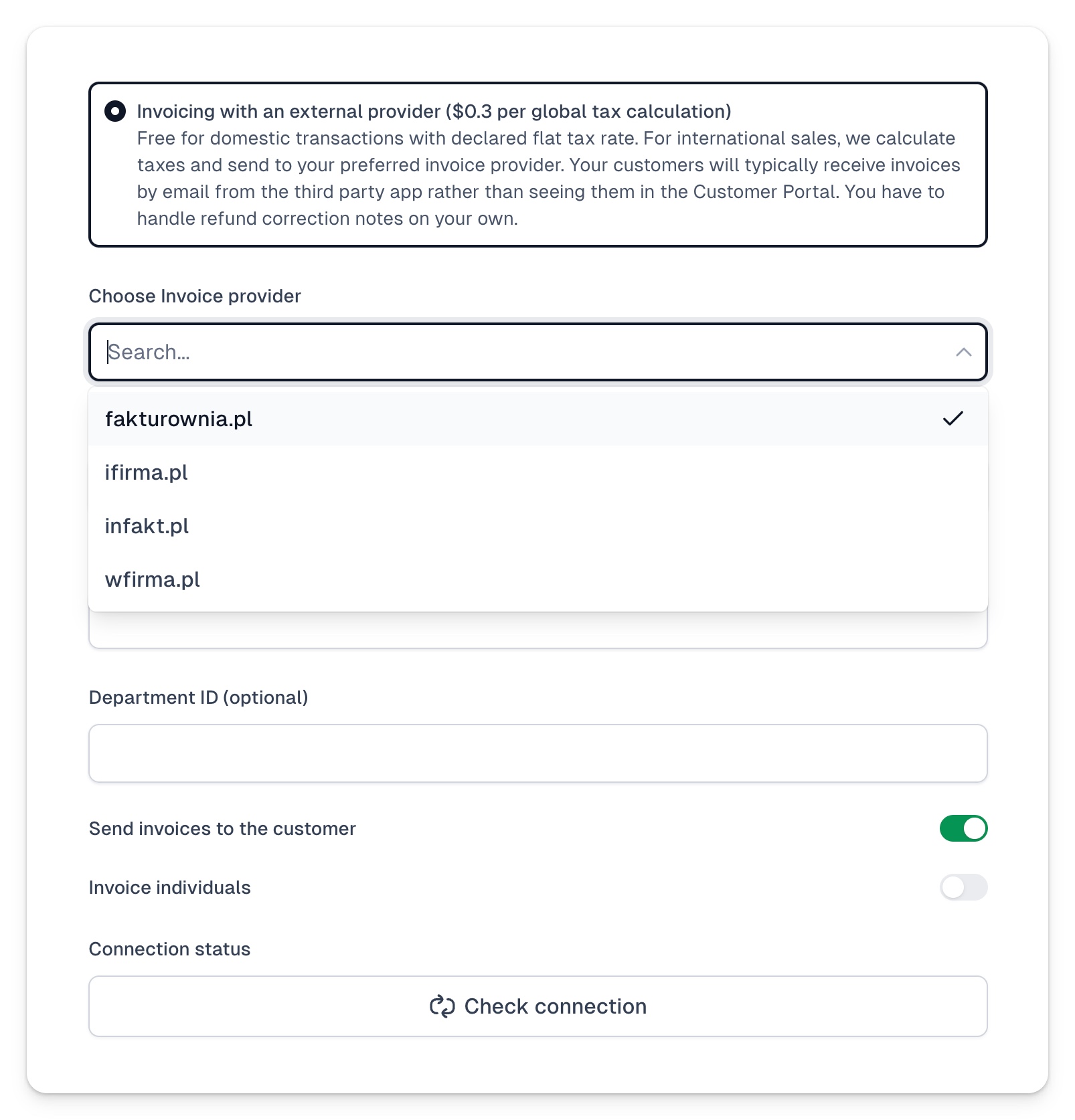
You can also use third-party invoicing software that we integrate with. The list of currently supported providers includes:
- fakturownia
- ifirma
- infakt
- wfirma
After you choose your invoice provider, you will need to establish a connection. Here’s how:
- Choose an invoice provider from the list.
- Provide your email address or account name (if required).
- Add API key(s).
- Choose if you want to send invoices to the customer.
- Choose if you want to invoice individuals.
- Click Connect.
Once you’ve chosen your billing solution, it’s time to set up your local tax settings.